PTO and time tracking that replaces the spreadsheet.
Know who's off, who's in, and what payroll owes. PTO software and time tracking software in one login—GPS clock-in, mileage tracking, and payroll-ready exports. Your team clocks in and requests time off from their phone; you approve in a click. Built for US & Canada teams.
Create your workspace by September 15, 2026 and TimeOff Manager stays free forever. We want as many people as possible to use TimeOff Manager and tell us what works. Sign up before the deadline and your account stays free forever — we only ask that you share honest feedback and a review when you can.
One click puts you inside a real 52-person company account — look around, nothing to set up.
Already have an account? Login
Up and running in three steps
GPS clock-in, clock out, mileage tracking, and payroll-ready exports — up and running in three steps. Most teams finish in under 15 minutes.
Add your team
Invite employees in a couple of clicks. The setup wizard picks sensible leave policies for your state or province.
They request & clock in
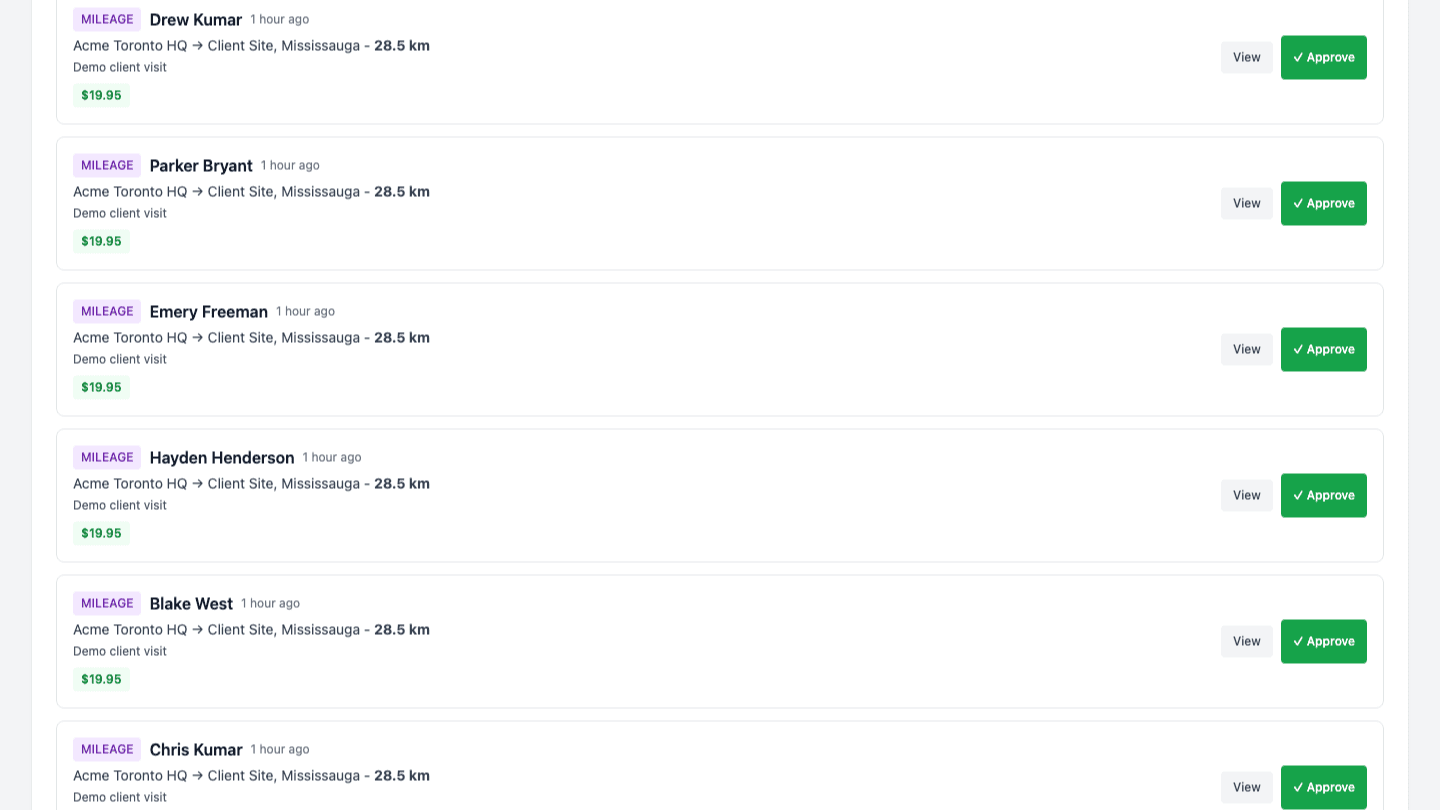
Employees request PTO, use clock in / clock out with employee GPS tracking, and log mileage from their phone—including kiosk clock in clock off when a shared tablet is easier.
You approve & export
Approve with one click, see everyone on a shared calendar, and hand your accountant payroll-ready Excel/CSV reports.
Create your workspace by September 15, 2026 and TimeOff Manager stays free forever.
Same price at any team size. See pricing ↓
PTO Software, Vacation Tracking, Clock in Software, Employee Tracking & Time management software
Most teams buy separate PTO software and employee time tracking software—then fight integrations. TimeOff Manager unifies PTO tracking, vacation tracking, employee tracking, clock in software, and mileage tracking so Ops and HR stay aligned.
Mobile clock in / clock out, kiosk clock in clock off, and employee GPS tracking on every punch—plus mileage tracking fields in the same exports finance already uses for payroll.
Leave Calendar
Visual calendar showing all employee leaves, public holidays, and team availability at a glance
Quick Approvals
Streamlined approval workflow with email notifications for managers and employees
Vacation Tracking
PTO tracking for vacation, sick, and personal days—balances and accruals update in real time so employee tracking stays accurate.
Clock In Software & GPS
Employee time tracking software with clock in / clock out, employee GPS tracking, geofencing, work schedules, timesheets, and payroll-ready exports.
Timesheets & Overtime
Weekly/bi-weekly timesheets with overtime tracking, approval workflow, and automatic calculations
Excel & CSV Reports
Export Master Employee Lists, PTO Usage Reports, Payroll Data, and Year-End summaries for your accountant
Smart Employee Wizard
Guided employee onboarding with statutory PTO minimum recommendations for US states and Canadian provinces
API Integration
RESTful API for seamless integration with payroll systems, HRIS, and custom applications
Multi-Company Support
Manage multiple companies with isolated data and custom policies for each organization
US & Canada Compliance
Statutory PTO minimum recommendations by state/province, public holiday sync, and jurisdiction-specific setup guidance — you remain responsible for your own policies and legal obligations
Mileage & Reimbursement
Log business trips with GPS routes, automatic distance calculation, photo attachments, saved locations, and reimbursement tracking
Work Location Management
Multiple work locations with geofencing, GPS validation, and automatic timezone detection
Schedule Templates
Reusable shift templates with bulk assignment, schedule exceptions, and conflict detection
Custom Leave Types
Create company-specific leave types beyond standard vacation, sick, and personal days
Compensation & Payroll
Track employee compensation, manage payroll runs, generate payslips, and handle job offers
15 features included — all in one platform
PTO Software & Employee Time Tracking for Growing Teams
Most small and mid-sized businesses start with spreadsheets for vacation tracking, then add a separate clock-in app, then email managers when someone needs approval. That patchwork creates errors: double-booked coverage, wrong PTO balances, and payroll exports that do not match what employees actually worked. TimeOff Manager replaces those disconnected tools with one platform built for US and Canadian teams.
As PTO software, it handles accruals, carryover rules, custom leave types, and manager approvals. Employees request time off from their phone or desktop; managers approve in one click; balances update automatically. The team calendar shows who is out today, what is pending, and how holidays affect coverage—so scheduling decisions are based on live data, not guesswork.
As employee time tracking software, it supports mobile clock in / clock out, shared kiosk PIN devices, optional GPS validation at punch time, weekly schedules, shift templates, timesheets, breaks, and overtime where your policies require it. Approved hours flow into the same exports finance already uses, which means less re-keying before payroll runs.
Operations teams use TimeOff Manager when they need reliable employee tracking without enterprise complexity. HR gets compliant onboarding guidance for all 50 US states and 13 Canadian provinces. Finance gets Excel and CSV reports—master employee lists, PTO usage, payroll data, and year-end summaries. Developers can connect HRIS or payroll systems through a documented REST API with API key authentication.
Whether you are replacing manual vacation tracking, rolling out a GPS time clock for field staff, or standardizing mileage reimbursement, the goal is the same: one source of truth for leave, attendance, and exports. Flat pricing with unlimited employees keeps costs predictable as you grow.
Questions? See the FAQ below or contact support.
Employee Onboarding Made Easy
Our intelligent Employee Wizard guides you through comprehensive employee setup and recommends statutory PTO minimums for US states and Canadian provinces. You remain responsible for your own leave policies and legal obligations.
Smart Compliance Engine
Automatically calculates minimum PTO requirements based on employee location and local labor laws
Location-Aware Setup
Google Maps integration for work locations with automatic timezone and jurisdiction detection
Comprehensive Employee Profiles
Collect all necessary information including emergency contacts, payroll IDs, and manager assignments
Instant Policy Generation
Automatically generates leave policies with proper vacation, sick, and personal day allocations
Statutory PTO guidance: Our wizard recommends up-to-date PTO minimums for all 50 US states and 13 Canadian provinces/territories. Your organization is responsible for adopting policies that meet its legal and contractual obligations.
Guided setup collects employee details, work locations, and jurisdiction-specific PTO minimums in one flow.
Why Choose TimeOff Manager?
Save Time and Reduce Errors
Automate leave calculations and eliminate manual tracking spreadsheets
Improve Employee Satisfaction
Self-service portal empowers employees to manage their own leave requests
US/Canada statutory PTO guidance
Recommends state and provincial PTO minimums during setup; you configure and own your final policies
Scale with Your Business
From small teams to large enterprises, our system grows with you
Color-coded leave types, pending approvals, and team availability in a single calendar view managers can trust.
Built for Accountants & HR Teams
Generate professional Excel and CSV reports that your accountant will love. Export employee data, PTO usage, payroll information, and year-end summaries with one click.
Master Employee Reports
Complete employee information with current PTO balances, perfect for payroll setup and HR audits
Payroll Data Export
Employee details plus days used for payroll deductions, ideal for monthly payroll processing
Year-End Reports
PTO balances, carryover calculations, and compliance data for year-end accounting and tax reporting
PTO Usage History
Detailed leave request history with approval tracking for compliance reporting and accrual calculations
Export Formats
Excel (.xlsx)
Professional formatted spreadsheets
CSV (.csv)
Universal format for any system
Perfect for: Accountants, Payroll Departments, HRIS Integration, and Tax Preparation
Powerful API for Seamless Integration
Connect TimeOff Manager with your existing HR systems, payroll software, or custom applications using our comprehensive RESTful API.
RESTful API Design
Standard HTTP methods with JSON responses for easy integration
Comprehensive Employee Data
Access employee info, leave balances, and request history via API
Secure Authentication
API key authentication with rate limiting and IP restrictions
Real-time Webhooks
Get instant notifications when leave requests are created or approved
Example endpoints
List employees, read leave balances, submit or approve requests, and pull timesheet data with standard JSON over HTTPS. Authenticate with an API key in the X-API-Key header.
GET https://cdn.timeoffmanager.us/api/v1/employees — employee roster and balances
POST https://cdn.timeoffmanager.us/api/v1/leave-requests — create leave requests from your HRIS
Full reference, rate limits, and webhook payloads are in the API docs.
Integrations
Connects Directly to Your Accounting Software
Approved hours and mileage flow straight into your books — no re-typing timesheets, no CSV juggling. Connect once and TimeOff Manager keeps your accounting in sync automatically.

QuickBooks Online
Approved time entries are pushed as native QuickBooks time activities, matched to the right employee — ready for invoicing and payroll prep. Works with every QuickBooks Online plan.

FreshBooks
Tracked hours become billable time entries and approved mileage becomes expenses — automatically, so every reimbursable dollar makes it onto the invoice.
Secure OAuth connection — set up in under two minutes from your company settings. No add-on fees, included in your account. Prefer your own tooling? A full REST API and webhooks are included too.
Simple, Transparent Pricing
Create your workspace by September 15, 2026 and TimeOff Manager stays free forever. We want as many people as possible to use TimeOff Manager and tell us what works. Sign up before the deadline and your account stays free forever — we only ask that you share honest feedback and a review when you can.
Unlimited Plan
$9/month after September 15, 2026
Create your workspace by September 15, 2026 and TimeOff Manager stays free forever.
For unlimited users
- Unlimited employees - 10 or 10,000+
- PTO tracking & leave management
- GPS time clock & geofencing
- Mileage tracking & reimbursement
- Timesheets & work schedules
- Excel/CSV reports for payroll
- Compliance engine & API access
- Mobile apps & email support
- Cancel anytime - No setup fees
Fair pricing for everyone: Whether you have 10 employees or 10,000, the price stays the same.
TimeOff Kiosk — free with every plan
Turn any tablet or phone into a verified time clock
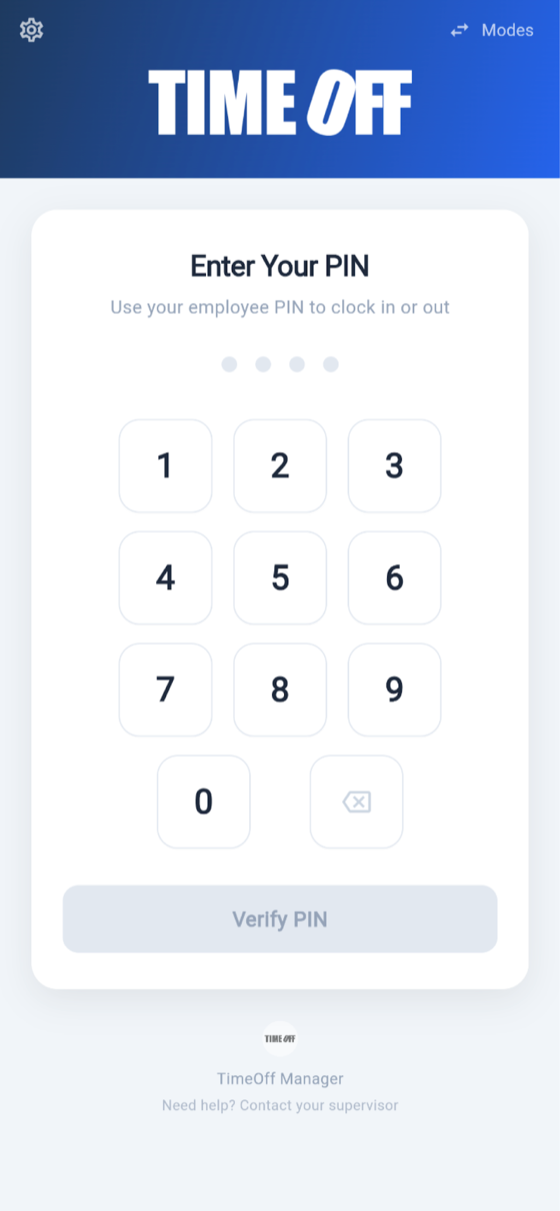
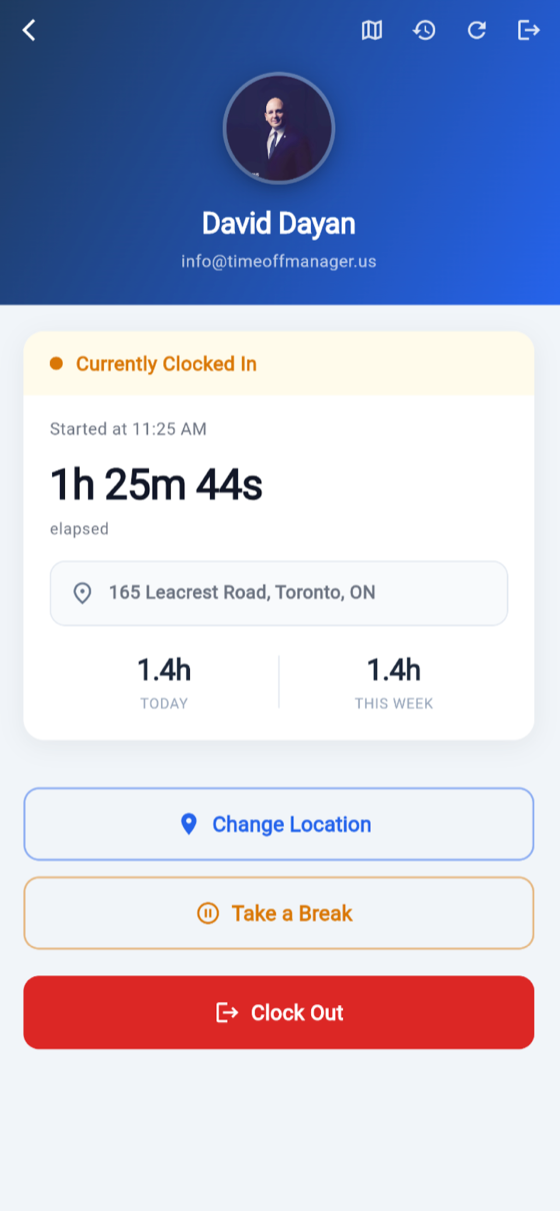
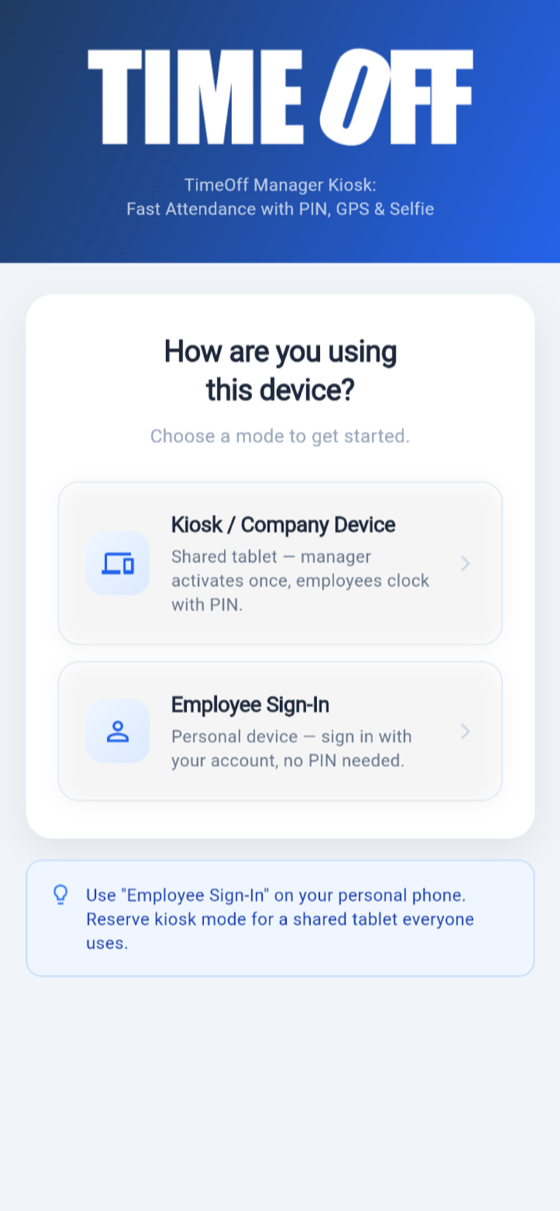
Mount a tablet by the door, or let employees clock in from their own phone. Every punch is PIN-verified, GPS-stamped, and can require a selfie—so you always know who clocked in, where, and when. Shared kiosks support simple clock in clock off; phones use full clock in / clock out with employee GPS tracking.
One shared device, your whole team
A manager activates the kiosk once; every employee clocks in and out with their own PIN. Perfect for shops, clinics, warehouses, and job sites.
Stops buddy punching
Automatic face detection snaps a photo at each punch, and GPS records the exact address—no more co-workers clocking in for each other.
Employees see their shift in real time
A live elapsed timer while clocked in, hours for today and this week, breaks, and their next scheduled shift after clocking out.
Punches flow straight into payroll
Every clock-in lands in the same timesheets, overtime tracking, and Excel/CSV exports your accountant already gets—nothing to re-enter.


Learn more about TimeOff Kiosk →
No app needed for time-off requests — employees request PTO and check balances from any phone browser.
PTO Software, PTO Tracking & Employee Time Tracking Software FAQs
Straight answers for teams comparing leave tools and attendance systems.
- Is TimeOff Manager really free right now?
- Yes — for a limited time. Create your workspace by September 15, 2026 and TimeOff Manager stays free forever. After September 15, 2026, new accounts use our regular plan ($9/month unlimited. 14-day free trial. No credit card.).
- Why are you offering free accounts?
- We want as many teams as possible using TimeOff Manager while we polish the product. Honest feedback and reviews from real businesses help us build something HR teams actually love.
- Do I need a credit card to sign up?
- No. During the launch offer there is no payment step — sign up with your work email and start inviting employees immediately.
- What happens after the promotion ends?
- Accounts created before September 15, 2026 stay free forever. New signups after that date use the standard $9/month unlimited plan ($9/month unlimited. 14-day free trial. No credit card.).
- How does TimeOff Manager compare to per-employee PTO tools?
- Most competitors charge per seat, so costs climb as you grow. TimeOff Manager includes PTO, time clocks, schedules, mileage, and payroll exports — qualifying signups before the deadline pay nothing, ever.
- Is there a free mobile app?
- Yes. The TimeOff Kiosk app for iPhone, iPad, and Android is included at no extra cost with every account — including free-forever launch accounts.
Run PTO, time tracking, and payroll prep in one place
Set up your team in minutes and run your first real approvals this week — leave, time clocks, schedules, mileage, and accountant-ready exports — Create your workspace by September 15, 2026 and TimeOff Manager stays free forever.
Create your workspace by September 15, 2026 and TimeOff Manager stays free forever.
Already a customer? Sign in here.