Canadian vs US HR Law & Compliance: A Complete SMB Guide (May 2026)
Managing employees across the US and Canadian border? You know the compliance headache. Different rules for PTO, overtime, and holidays can lead to costly mistakes. TimeOff Manager helps SMBs stay compliant.


Managing employees across the US and Canadian border? You know the compliance headache. Different rules for PTO, overtime, and holidays can lead to costly mistakes. TimeOff Manager helps SMBs stay compliant.
Canadian vs US HR Law & Compliance: A Complete SMB Guide (May 2026)
You’re running a business. Maybe you’ve got teams in Toronto and Buffalo, or Montreal and Burlington, Vermont. You might even have employees working remotely from Vancouver for a US-based company, or vice-versa. Great for talent, right? But then the HR questions hit:
- "How much vacation time does our Canadian team actually get? Is it 10 days, or 15, or more?"
- "Does overtime kick in after 8 hours a day, or 40 a week, or something else entirely? And what about daily rest periods?"
- "Are these US federal holidays the same as Canadian statutory holidays? What about provincial ones?"
These aren't just academic questions. Get them wrong, and you're looking at fines, back pay, and serious compliance headaches. HR compliance in 2026 is complex enough in one country, let alone two. This isn't just about federal laws; it's about state and provincial differences, too. It’s enough to make you wish everyone worked in the same zip code.
At TimeOff Manager, we built our system to handle this complexity without you needing a separate HR expert for every jurisdiction. We help you configure rules so your PTO, employee scheduling, and time clock software reflect local laws, no matter where your team is.
The Cross-Border HR Compliance Problem: Why Your Spreadsheets Break
You know the drill. You start with a simple spreadsheet for vacation tracking. Then you add another for sick leave, another for statutory holidays, and yet another for daily punches. Suddenly, you have multiple sources of truth, each managed by a different person, with different interpretations of local labor laws.
- Leave Management: US FMLA, state-specific paid sick leave, varying vacation accrual. Canada has federal holidays, provincial holidays, and mandatory vacation entitlements that differ significantly. How do you track these distinct leave types and balances accurately for each employee?
- Overtime Tracking: In the US, federal overtime is generally 1.5x after 40 hours in a workweek, but many states have daily overtime rules (e.g., after 8 hours). California is notoriously strict. In Canada, overtime thresholds vary by province, often after 40 or 44 hours weekly, and sometimes after 8 or 10 hours daily. You need to apply the correct multiplier for the correct jurisdiction.
- Scheduling & Breaks: US states have varying meal and rest break requirements. Canadian provinces also have specific rules for breaks and daily/weekly maximum hours. Your shift scheduling needs to validate these rules automatically.
- Time Zones: A US manager approving PTO for a Canadian employee often deals with time zone differences. A punch recorded in PST needs to align with a schedule set in EST. Manual adjustments are error-prone.
- Payroll Integration: When it's time to run payroll, all these disparate data points need to come together. If leave isn't properly categorized, if overtime isn't calculated based on the right rules, or if statutory holidays aren't applied correctly, your payroll provider gets bad data. That means manual corrections, delays, and potential non-compliance.
This isn't just inefficient; it's a huge risk. US Department of Labor (DOL) and various Canadian provincial Ministries of Labour regularly audit businesses for wage and hour compliance. Penalties can be severe, especially when you're dealing with multiple jurisdictions.
What "Integrated" Actually Means for Cross-Border Compliance
Integrated doesn't just mean a fancy dashboard. It means a single source of truth for all your time and leave data, configured to reflect the specific laws governing each employee, wherever they work. For a cross-border SMB, this is critical for HR compliance in 2026.
- One Employee Record: Every employee, whether in Texas or Quebec, has a single profile. Their assigned location dictates the rules applied to them.
- Configurable Leave Types: You can create custom leave types for US FMLA, state-specific sick leave, Canadian vacation entitlements, statutory holidays, and more. Each type can have its own accrual rules, eligibility, and approval workflow.
- Location-Specific Overtime Rules: Set up distinct overtime thresholds and multipliers for different work locations. Overtime for an employee in Ontario will be calculated differently than for an employee in New York.
- Automated Scheduling Validation: Your employee scheduling software automatically flags violations of local break rules or maximum work hours as you build schedules.
- Unified Time Tracking: Whether employees use a PIN kiosk, web clock, or GPS time clock on their mobile, all punches feed into one system. Time zone conversions happen automatically.
- Comprehensive Reporting: Generate reports that combine all time, leave, and overtime data, making it easy to audit and prepare for payroll, no matter the jurisdiction.
This approach eliminates the need for manual reconciliation between spreadsheets, reduces errors, and gives you confidence that you're adhering to the diverse legal requirements across the US and Canada.
Employee vs. Manager: A Clear View for Everyone
Whether your team is in Vancouver or Virginia, everyone needs clear access to their time and leave information. And managers need the tools to approve requests and review time without confusion.
For Employees: Clarity and Self-Service
Your employees don't need to know the intricacies of cross-border labor law. They just need to know their own entitlements and how to request time off or record their hours. In TimeOff Manager:
- They see their available leave balances (vacation, sick, personal time) on their dashboard. These balances are specific to their assigned location and the rules you've configured.
- They can easily submit leave requests, knowing the system will route it to the correct manager.
- They can view their employee timesheet, ensuring their recorded hours and approved leave are accurate before payroll.
- If you use it, they can submit mileage reimbursement requests, which are then tracked separately from hours worked.
For Managers & HR: Control and Compliance
Managers and HR leads are on the front lines of compliance. They need to approve requests, review time, and ensure coverage, all while keeping local laws in mind. TimeOff Manager brings this all into one place:
- The Manager & HR hub at
/timesheetshows you the daily roster, weekly grid, and monthly rollups for your team. You see punches, approved leave, and scheduled shifts side-by-side. This is crucial for catching potential overtime before it hits payroll. - You can review and approve all pending leave requests from one screen, with full visibility into team coverage on the team timeline calendar.
- When building schedules at
/admin/schedule, the system flags potential violations of local break laws or maximum hours, helping you create compliant shift templates.

/timesheet, showing punches and approved leave before payroll export.Configuring TimeOff Manager for US & Canadian HR Compliance
Let's get practical. How do you actually set up TimeOff Manager to handle the distinct HR laws in the US and Canada?
1. Defining Work Locations and Time Zones
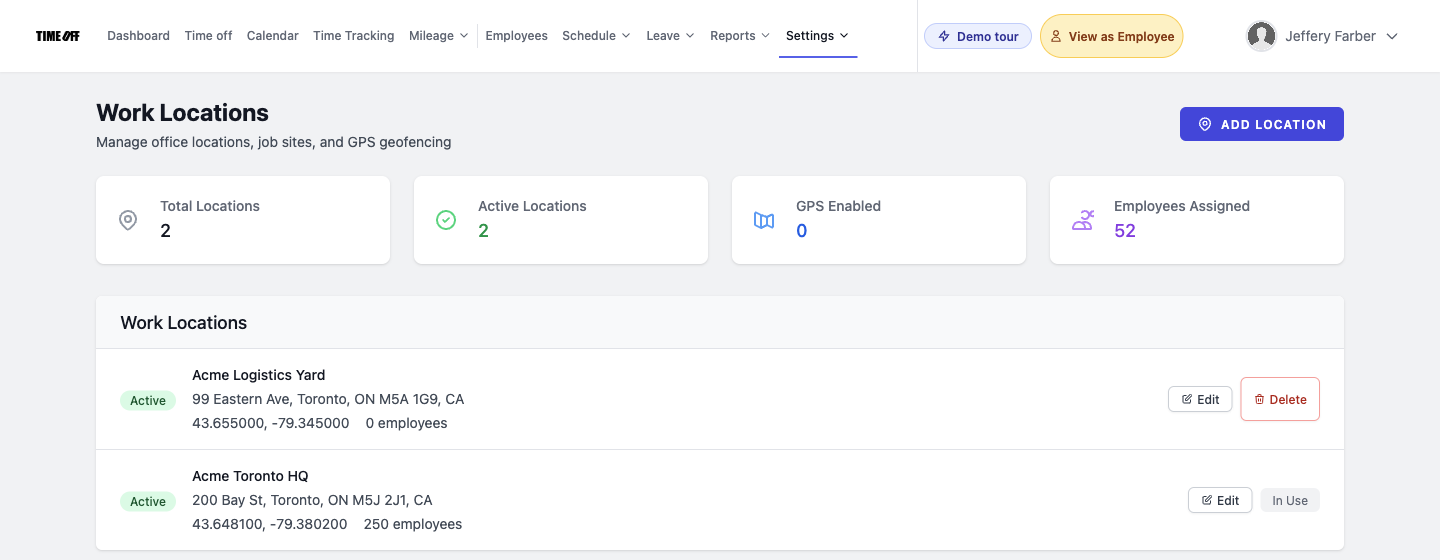
This is your foundation. Each physical office or remote work location needs to be defined. This allows you to associate specific labor laws, holidays, and overtime rules with that location.
Go to Work locations (admin) and set up each relevant city or region. Assign the correct time zone to each location. This ensures that a punch recorded by an employee in Vancouver (PST) is correctly interpreted by a manager in New York (EST) and that daily overtime calculations align with local time.
2. Customizing Leave Types for Each Jurisdiction
The US and Canada have vastly different approaches to paid time off. In the US, vacation and sick leave are often employer-discretionary, though many states mandate paid sick leave. In Canada, vacation is a statutory entitlement, with minimums varying by province and often increasing with tenure.
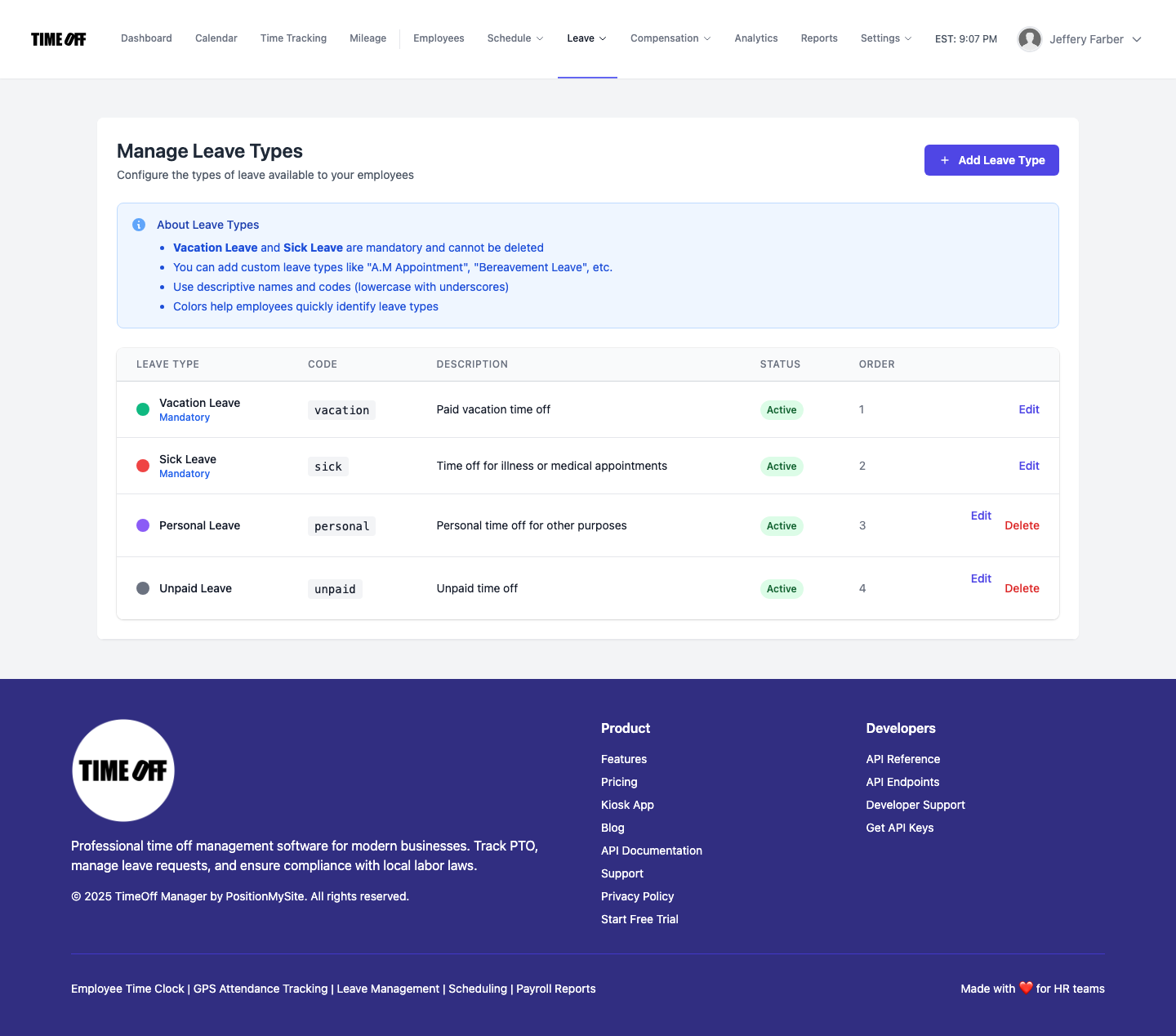
Navigate to Leave: Custom leave types (admin). Here, you can create specific leave types:
- US: "Paid Sick Leave (CA)", "Vacation (US)", "FMLA Leave". You can set accrual rates, caps, and eligibility rules.
- Canada: "Vacation (ON)", "Sick Leave (BC)", "Statutory Holiday (QC)". For vacation, you'd configure the accrual to meet provincial minimums (e.g., 2 weeks after 1 year, 3 weeks after 5 years in some provinces).
Assign these leave types to employees based on their work location. An employee in Ontario will see their "Vacation (ON)" balance, while an employee in California sees their "Paid Sick Leave (CA)" balance.
3. Overtime Rules: State vs. Province
This is where things get really tricky. US federal law typically mandates overtime after 40 hours in a workweek, but states like California also require daily overtime after 8 hours. Canadian provinces have their own thresholds, often 40 or 44 hours weekly, and sometimes 8 or 10 hours daily, with different multipliers.
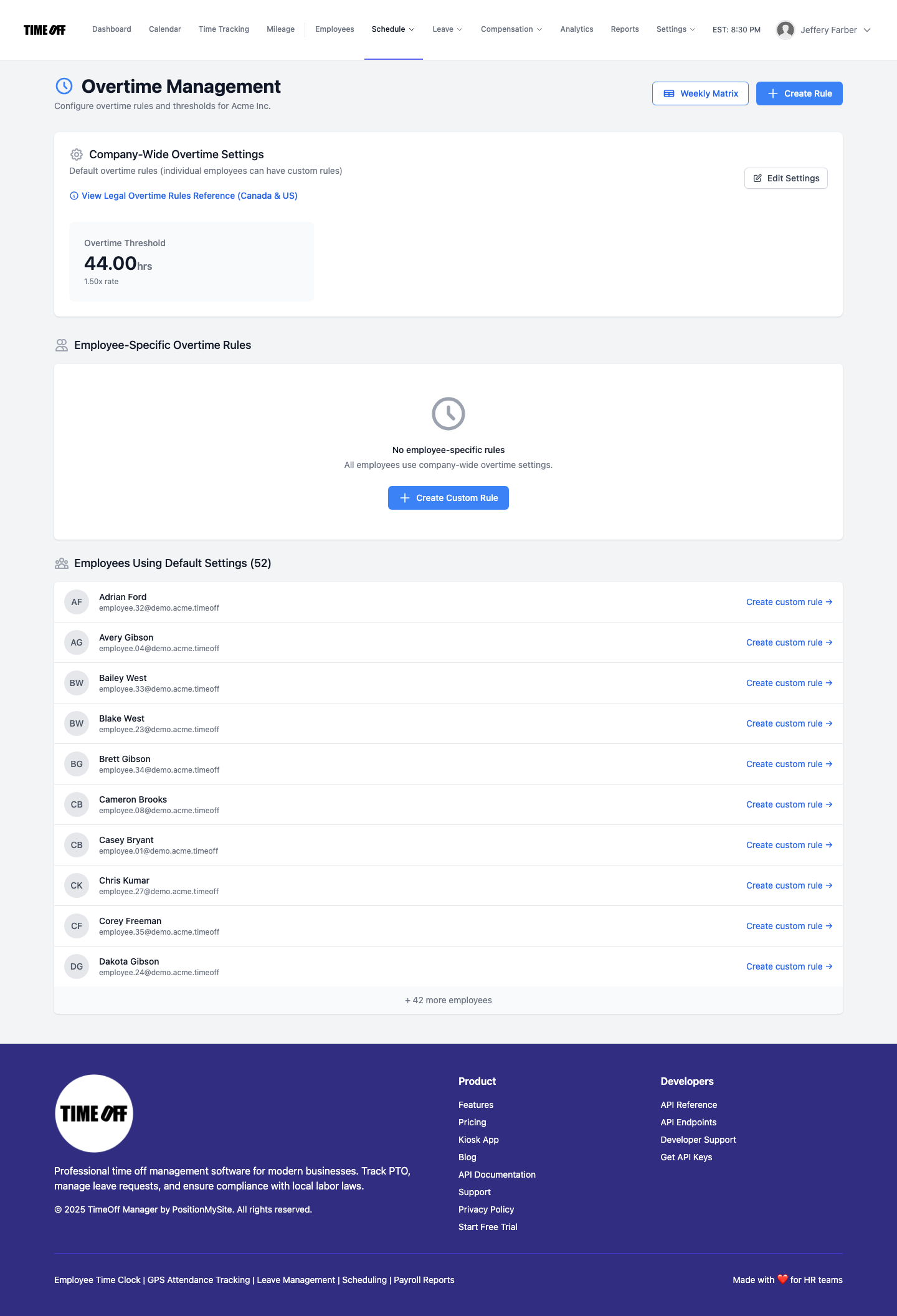
Go to Overtime: Admin rules at /admin/overtime. Here, you can define multiple sets of overtime rules:
- US Federal/State: Set up a rule for "US Federal Overtime (40h/week)" and another for "California Daily/Weekly Overtime" that includes daily thresholds.
- Canadian Provincial: Create rules for "Ontario Overtime (44h/week)" and "BC Overtime (8h/day, 40h/week)".
Then, assign the correct overtime rule set to each employee based on their work location. TimeOff Manager will automatically apply these rules to their recorded punches.
4. Scheduling Validation for Breaks and Limits
Both countries have rules about breaks and maximum work hours. In the US, some states require paid rest breaks and unpaid meal breaks after certain hours. In Canada, provinces like Ontario have specific rules for daily rest periods, meal breaks, and maximum hours per day/week.
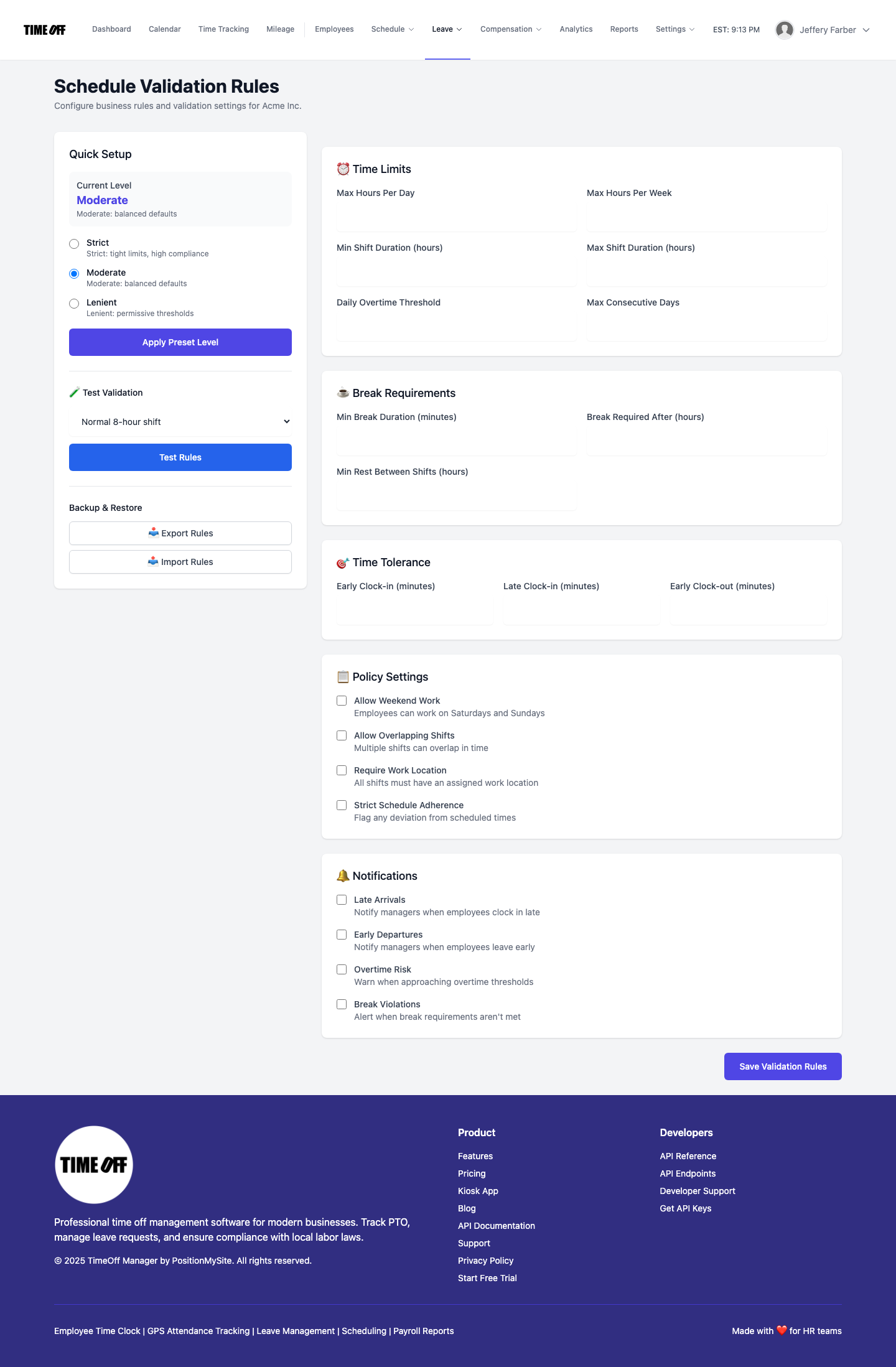
Use Schedule: Validation rules (admin) at /admin/validation. You can create rules like:
- "US Break Rules (MA)": e.g., 30-minute unpaid meal break after 6 hours.
- "Canadian Break Rules (AB)": e.g., 30-minute break after 5 consecutive hours of work.
When managers use the schedule management tool, TimeOff Manager will highlight any shifts that violate these assigned validation rules, helping them build compliant schedules.
5. Managing Statutory and Public Holidays
This is often overlooked, but costly. The US has federal holidays, but employers aren't generally required to pay for them unless specified by contract. Canada has federal statutory holidays, but provinces also have their own, and rules for eligibility and holiday pay vary.
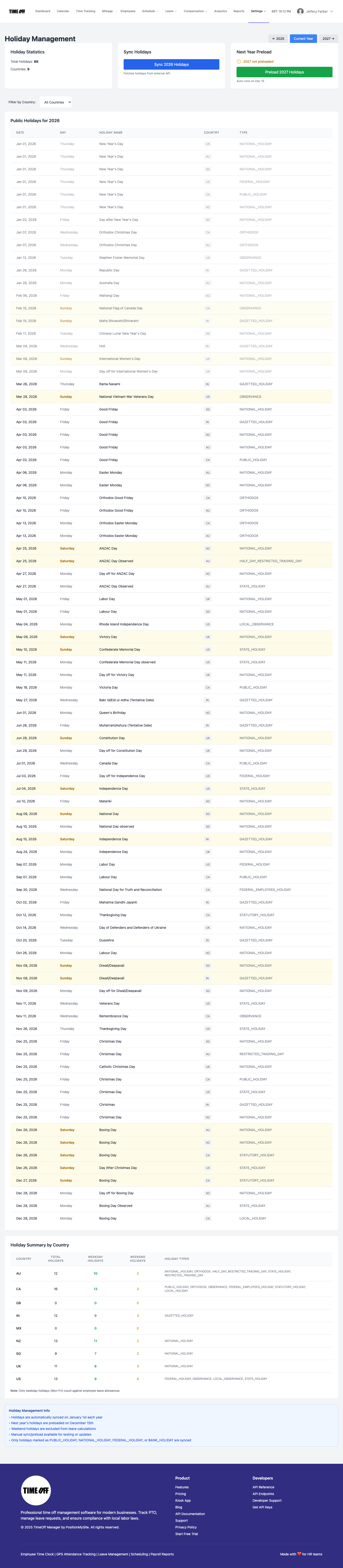
In Holiday management (admin), you can create and assign holiday calendars to specific work locations. So, your team in Quebec will see and be paid for Fête Nationale, while your team in Ohio observes Memorial Day.
From Punch to Payroll: A Cross-Border Compliance Story for SMB Owners
Imagine you're an SMB owner with employees across Washington State and British Columbia. Here's how TimeOff Manager helps you navigate the differences for HR compliance in 2026:
-
Set the Stage with Locations & Rules:
First, you use the setup wizard and then go to Work locations (admin). You create a "Seattle Office" (PST) and a "Vancouver Office" (PST). You assign the "Washington State Overtime Rules" to Seattle employees (e.g., 1.5x after 40 hours weekly, specific meal break requirements) and "British Columbia Overtime Rules" to Vancouver employees (e.g., 1.5x after 8 hours daily and 40 hours weekly, 2x after 12 hours daily). You also create custom leave types: "WA Paid Sick Leave" and "BC Vacation Entitlement."
-
Employee Records Time & Requests Leave:
Your employee Sarah in Vancouver needs a day off. She logs into her dashboard, checks her "BC Vacation Entitlement" balance, and submits a request. Her colleague Mark in Seattle punches in using the PIN kiosk at
/clockinat 8:00 AM PST and out at 4:30 PM PST. All this data flows into TimeOff Manager, automatically timestamped and associated with their respective locations. -
Manager Reviews & Approves:
Their manager, based in Seattle, opens the Manager & HR hub at
/timesheet. They see Sarah's leave request and Mark's punches. Before approving Sarah's vacation, they check the team timeline calendar to ensure adequate coverage for Vancouver. They review Mark's weekly grid, and because he worked 45 hours one week, TimeOff Manager automatically flags 5 hours as overtime according to Washington State rules. -
Scheduling for Compliance:
The manager needs to build a schedule for the next week. Using Schedule management, they create shifts. For the Vancouver team, if they try to schedule an employee for a 13-hour day, TimeOff Manager's "BC Daily Overtime" validation rule (which you set up in Schedule: Validation rules (admin)) immediately flags it as a potential 2x overtime violation, prompting the manager to adjust the shift.
-
Payroll Handoff:
At the end of the pay period, all approved leave, accurate punches, and correctly calculated overtime (based on WA or BC rules) are consolidated. You can generate a comprehensive report from Reports & exports (admin) or use the Run Payroll wizard if enabled. This clean, compliant data is then ready to be sent to your payroll provider, eliminating manual data entry and ensuring accurate paychecks across both countries. No more guessing if Canadian vacation accrual was correct or if US daily overtime was applied.
This integrated workflow ensures that even with complex cross-border compliance, you maintain accuracy and control, reducing your risk and administrative burden.
Choosing Your HR Software: One Workflow vs. Separate Products
When you're operating across the US and Canadian border, the temptation might be to use separate systems: one for US HR, one for Canadian. Or, to cobble together a time clock, a PTO tracker, and a scheduling tool from different vendors.
But this is exactly what leads to compliance gaps and manual work. Each separate system has its own rules, its own data, and its own way of interpreting time. Integrating them is often a nightmare, leading to conflicting records about an employee's hours or leave.
TimeOff Manager is built to be that single, flexible workflow. Your PTO software, time clock software, employee scheduling software, overtime tracking, and leave management system all live in one place. This means:
- Your employees clock in, request leave, and see their schedule in one consistent interface.
- Your managers approve time and leave with full context, including scheduled shifts and coverage, across all locations.
- Your HR team configures rules once, applying them specifically to the relevant employees and locations.
- Your payroll data is accurate and pre-calculated according to local laws, ready for your outside payroll provider.
This integrated approach is the only way to truly manage the complexities of HR compliance in 2026 for cross-border SMBs without needing a small army of HR specialists.
Compliance: It's Not Just a Suggestion
Navigating the legal landscape of both the United States and Canada requires diligence. This article provides practical guidance on how to configure your TimeOff Manager system to align with various requirements. However, this is not legal advice. Always consult with qualified legal counsel regarding specific HR compliance matters in your jurisdictions.
Here are some resources to help you stay informed:
- United States:
- Canada:
- Employment and Social Development Canada (ESDC) - Federal Labour Standards
- For provincial standards, you'll need to check specific provincial Ministry of Labour websites, e.g., Ontario Ministry of Labour, Training and Skills Development, or WorkSafeBC (British Columbia).
Ready to Simplify Cross-Border HR?
The best way to understand how TimeOff Manager can simplify your HR compliance across the US and Canada is to see it in action. We offer a fully resettable demo environment so you can play around with creating custom leave types, setting up overtime rules, and building schedules for different locations.
Access our Demo logins and explore how we can help you streamline your operations, reduce compliance risk, and free up your time to focus on growing your business, not untangling spreadsheets.
FAQ: Canadian vs. US HR Compliance
Q: Can TimeOff Manager handle different vacation accrual rates for US and Canadian employees?
A: Absolutely. In Leave: Custom leave types (admin), you can create distinct vacation types for US and Canadian employees, each with its own accrual rules, caps, and eligibility settings. You then assign these specific leave types to employees based on their work location.
Q: How does the system handle different overtime rules between US states and Canadian provinces?
A: TimeOff Manager allows you to define multiple sets of overtime rules in Overtime: Admin rules. You can specify different thresholds (e.g., 8 hours daily, 40 hours weekly, 44 hours weekly) and multipliers (1.5x, 2x) for different locations. Employees are then assigned the correct rule set based on their designated work location.
Q: Does TimeOff Manager account for different public holidays in the US and Canada?
A: Yes. You can set up custom holiday calendars in Holiday management (admin). Create separate holiday lists for US federal holidays, specific US state holidays, and various Canadian provincial statutory holidays. These lists are then assigned to your work locations, ensuring correct holiday pay and time-off tracking.
Q: Can I track mileage reimbursement for employees in both countries?
A: Yes, if the mileage module is enabled. Employees can submit mileage reimbursement requests, which are then managed by admins in Mileage: Management (admin). While TimeOff Manager tracks the mileage, you'll need to ensure your reimbursement rates comply with local tax authorities (e.g., IRS in the US, CRA in Canada).
Q: How does TimeOff Manager help with scheduling compliance for breaks and maximum hours across borders?
A: Our Schedule: Validation rules (admin) feature lets you define rules for meal breaks, rest periods, and maximum daily/weekly hours specific to US states or Canadian provinces. When managers create schedules using the Schedule management tool, the system automatically flags any shifts that violate the assigned validation rules, helping you stay compliant.