Shift Scheduling Software For Small Business (2026): What SMB Teams Need to Know
Shift scheduling software helps small businesses save time, prevent costly overtime, and ensure adequate coverage by integrating schedules, PTO, and time tracking.


Shift scheduling software helps small businesses save time, prevent costly overtime, and ensure adequate coverage by integrating schedules, PTO, and time tracking.
Shift scheduling software helps small businesses save an average of 5-10 hours per week on administrative tasks, cut overtime costs by up to 15%, and ensure 99% shift coverage by integrating schedules, PTO, and time tracking. Instead of juggling spreadsheets and last-minute phone calls, you get a single platform where you can build schedules, manage time off requests, and see potential coverage gaps before they become problems. This integration is key to avoiding payroll surprises and keeping your team happy and productive.
Why Manual Scheduling Breaks Today's SMBs
If you're still using Excel, whiteboards, or even just a group chat for employee scheduling, you know the headaches. It's a constant battle. You spend hours building a schedule, only for someone to request PTO, forcing you to start over. Or worse, a manager approves time off without seeing the full team calendar, leaving you short-staffed during a crucial shift.
This fragmented approach leads to real problems. You end up with unexpected overtime costs because you couldn't see total hours before publishing the schedule. Employee morale takes a hit when shifts are constantly changing or when they feel unsupported due to poor coverage. And when it comes time for payroll, you're reconciling data from different sources: the schedule, the approved leave, and the actual hours punched. This isn't just inefficient; it's a direct drain on your bottom line and your sanity.
I've seen it countless times: a small business owner editing an Excel sheet after the fact, trying to remember who worked what, or realizing too late that a timezone mismatch led to a miscalculated shift. That's why we built TimeOff Manager to bring all these pieces together.
How Employee Scheduling Software Saves Time and Prevents Overtime
The right employee scheduling software doesn't just put names on a grid; it's a proactive tool that saves you time and, crucially, prevents costly overtime. Manual scheduling makes it nearly impossible to consistently track employee hours against legal limits or company policies. You might accidentally schedule someone for too many hours in a week, only realizing the overtime cost when payroll comes around.
With TimeOff Manager, you set your overtime rules upfront. In Company Settings, under the Overtime tab, you define your work week start day, standard hours, and overtime thresholds. This is critical for HR compliance in 2026, ensuring you're not accidentally violating labor laws.
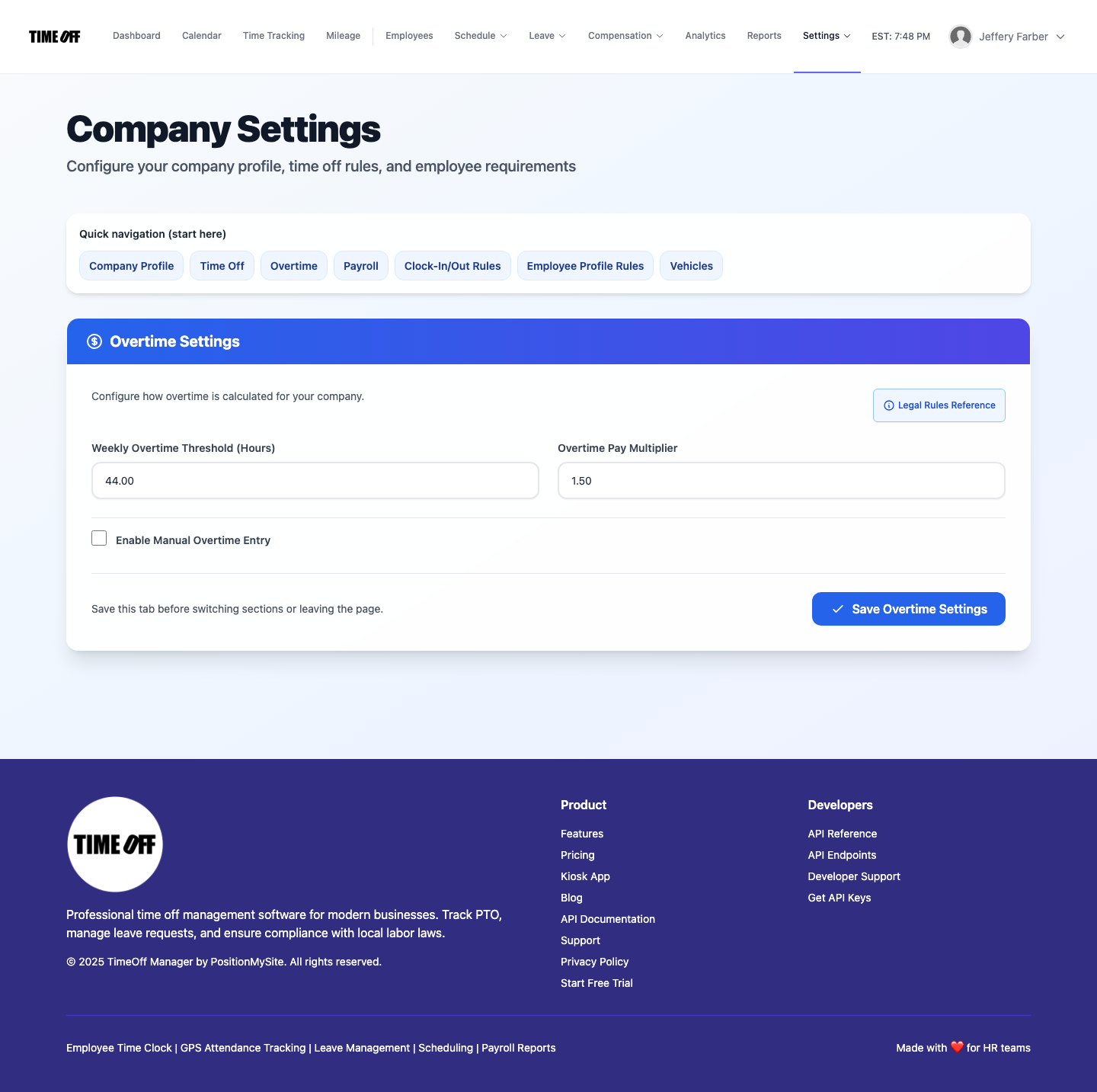
Beyond defaults, you can fine-tune specific rules at /admin/overtime. Here, you can set up different overtime multipliers and rules based on daily, weekly, or even consecutive-day thresholds. This means the system knows your rules and helps you enforce them before a schedule is even finalized.
When you're building a schedule using Shift Templates, the software can alert you to potential overtime. You can create reusable shift blocks – like "Morning 8-4" or "Evening 4-10" – complete with assigned roles or skills. This drastically speeds up schedule creation. Instead of typing in times for every shift, every week, you just drag and drop templates.
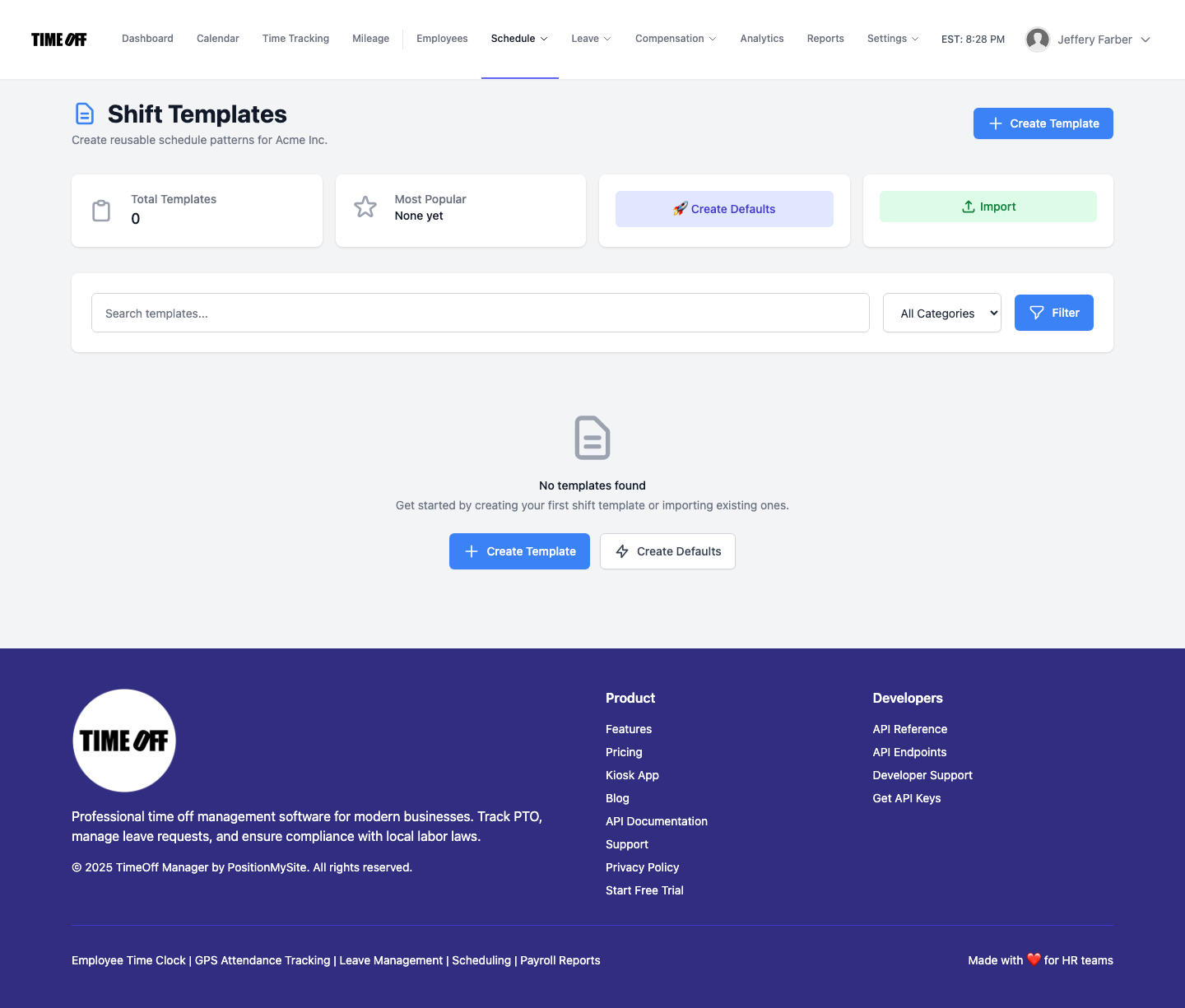
As you assign shifts, TimeOff Manager keeps a running tally of projected hours. If an employee is about to hit overtime based on your configured rules, you'll see a flag. This proactive warning lets you adjust the schedule *before* it's published, saving you money and preventing compliance issues. It's about shifting from reactive problem-solving to proactive prevention, giving you control over your labor costs.
Finding the Right Shift Scheduling Software for Small Business in 2026
For small businesses, "right" means software that's powerful enough to handle your needs, yet simple enough that you and your team can use it without a steep learning curve. The best shift scheduling software for small business in 2026 needs to be more than just a calendar; it needs to be an integrated solution that speaks to your PTO, time clock, and eventually, your payroll.
You need a system that can handle the nuances of your business, whether you have fixed shifts, rotating schedules, or on-call teams. TimeOff Manager provides robust schedule management tools. You can build schedules weeks or months in advance, copy them forward, and make bulk edits when needed. This is a huge time-saver compared to manual methods, which often require recreating schedules from scratch or making tedious individual adjustments.
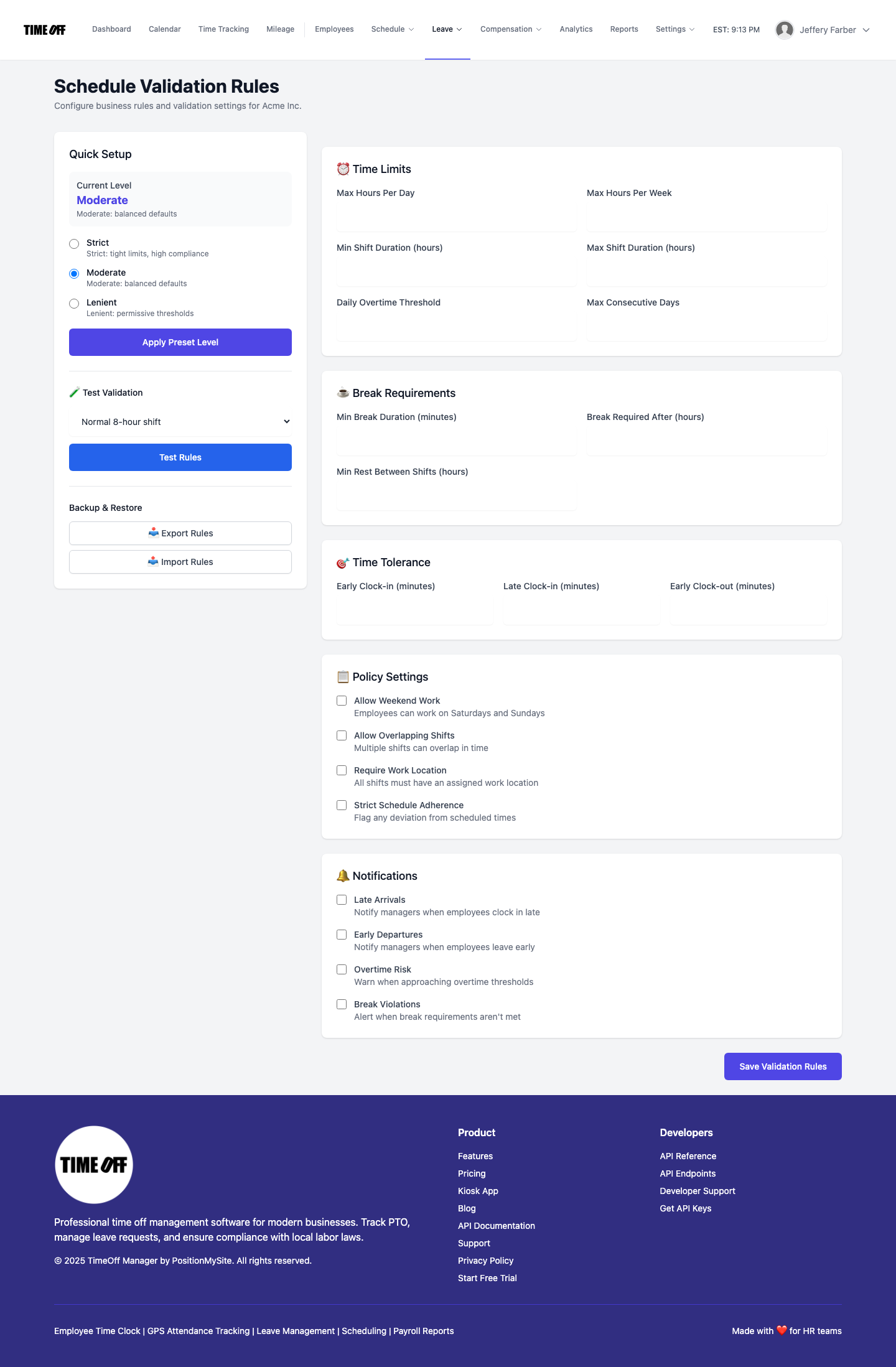
Beyond just creating schedules, the software needs to enforce your rules. Our Schedule Validation rules allow you to define things like minimum break times between shifts, maximum consecutive workdays, or daily/weekly hour limits. These rules run in the background, flagging potential violations as you build the schedule. This is invaluable for HR compliance 2026, protecting both your business and your employees from burnout or accidental violations.
Look for flexibility. Can you easily swap shifts? Can employees view their schedules and request changes from their mobile device? TimeOff Manager allows employees to see their assigned shifts on their personal dashboard and timesheet. This self-service capability reduces the number of calls and texts you get asking "What's my shift next week?" freeing up your time for more strategic tasks.
Ensuring Coverage and Visibility with Integrated PTO Scheduling
One of the biggest pain points in scheduling is managing time off. A scheduling system that doesn't "talk" to your PTO system is a recipe for disaster. You approve vacation, but it doesn't show up on the schedule, leading to understaffing. Or you deny a request because you think coverage is tight, only to realize later you had more people than you thought.
Integrated PTO software like TimeOff Manager brings leave management and scheduling together. When an employee submits a leave request via their My Requests page, it goes directly into the same system that holds your schedule. As a manager, when you go to /admin/requests to approve or deny, you have the full context.
The real magic happens on the Team Timeline calendar. This is your command center for coverage visibility. You can see who's scheduled, who's punched in (if you're using our time clock), and who has approved or pending PTO. This visual representation makes it incredibly easy to spot potential coverage gaps days or weeks in advance. If you see two key employees have approved vacation during the same critical period, you can adjust the schedule or find backup well before the crisis hits.
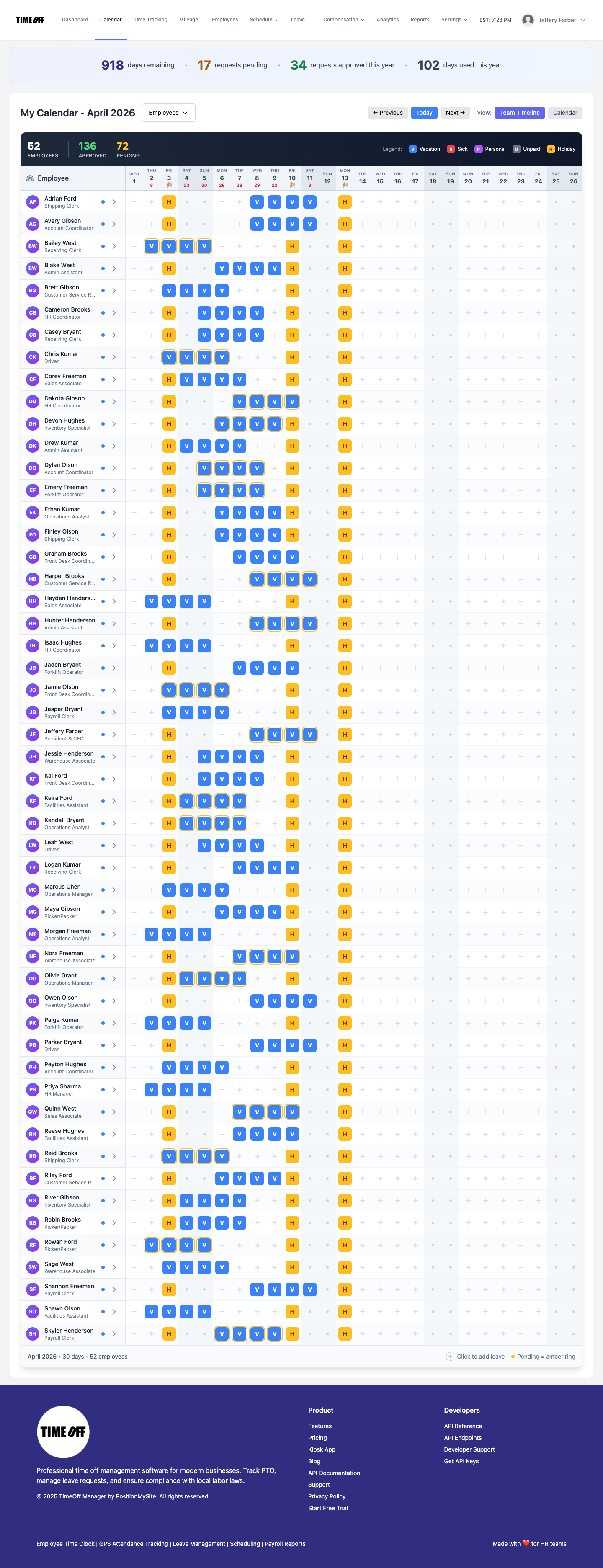
This level of visibility is invaluable for avoiding last-minute scrambling. It means you can make informed decisions about PTO approvals, knowing exactly how they'll impact your shift coverage. It also empowers your employees, as they can often see potential conflicts themselves before submitting a request, leading to fewer rejections and smoother operations.
What Integrated Actually Means for Your Business
When I talk about "integrated," I'm talking about more than just different features in the same software. I mean a unified workflow that eliminates silos, reduces manual data entry, and ensures consistency across all your HR operations. For scheduling, PTO, and time tracking, it means:
- One Employee Record: All employee data—personal info, compensation, leave balances, assigned shifts—resides in one place. No more updating multiple spreadsheets or systems.
- One Clock Surface: Whether your team uses our PIN kiosk at /clockin, the web clock, or our GPS time clock on mobile, all punches flow directly into the same timesheet.
- One Weekly/Pay-Period View: The Manager & HR hub at /timesheet shows scheduled shifts, actual punches, and approved leave side-by-side. This is crucial for reviewing hours before payroll.
- Reports That Match Approvals: When you generate reports, the data for scheduled hours, actual hours, and approved PTO is consistent, because it all came from the same source. This makes payroll integration seamless.
This integrated approach means less time spent on manual checks and more actual, reliable data. You're not spending time cross-referencing different systems; you're reviewing a single, comprehensive view of your workforce's time and attendance.
Employee vs. Manager Flows: A Seamless Experience
A good scheduling system needs to work for everyone. It should be intuitive for employees to use, and powerful for managers to administer. In TimeOff Manager, we've designed distinct, yet interconnected, flows for both roles.
For Employees: Self-Service and Clarity
Your employees can access their personal dashboard at /dashboard to quickly see their upcoming shifts, current leave balances, and any pending requests. From there, they can easily navigate to My Requests to submit new PTO requests for vacation, sick leave, or any custom leave type you've configured. They can also view their own timesheet at /timesheet/employee to review their scheduled hours versus their actual punches.
This self-service model empowers employees, reduces administrative burden on HR and managers, and ensures everyone is on the same page regarding their schedule and time off.
For Managers & HR: Control and Oversight
Managers and HR leads have a powerful hub at /timesheet. This is where you get a comprehensive view of your team's daily roster, weekly grid, and monthly rollups. You can see scheduled shifts, actual clock-ins and outs, and any approved or pending leave.

From this view, you can easily spot discrepancies, approve or adjust time entries, and ensure everything is accurate before it goes to payroll. The system highlights potential overtime, giving you a chance to review and make corrections. You can also directly manage schedules at /admin/schedule, applying shift templates, making individual adjustments, and publishing new schedules.
For approving leave, the Manage Requests (admin) page provides a centralized place to review all incoming PTO requests, with direct links to the employee's calendar and team availability to help you make informed decisions about coverage.
Workflow Walkthrough: Building a Smart Schedule
Let's walk through a typical workflow for building and managing schedules with TimeOff Manager, from setup to payroll handoff.
1. Define Your Foundation: Company Settings and Overtime Rules
First, you'll want to ensure your company's core settings are in place. Navigate to Company Settings to define your work week, holidays, and locations. Then, head to /admin/overtime. Here, you'll set up your specific overtime rules, like when daily or weekly overtime kicks in, and any special multipliers. This ensures the system automatically flags potential overtime costs as you schedule.
2. Create Reusable Shift Templates
Go to /admin/templates. Create your common shifts, like "Opening Shift," "Mid-Day," or "Closing Shift." You can assign a default duration, a specific role, or even necessary skills. These templates will save you immense time when building your weekly schedule.
3. Build Your Schedule with Validation
Now, go to /admin/schedule. You can start with a blank week, copy a previous week, or import a template. Drag and drop your pre-defined shift templates onto the calendar for each employee. As you build, the system will apply any Schedule Validation rules you've set up (e.g., minimum rest between shifts, maximum hours). If you create a conflict, you'll get an alert, allowing you to fix it immediately.
You can also make individual adjustments for an employee directly from the schedule view using Schedule: Edit one employee. Once the schedule looks good, publish it. Employees will instantly see their updated schedules on their dashboards.
4. Manage PTO Requests and Coverage
Employees submit leave requests through their portal. As a manager, you'll receive notifications. Navigate to /admin/requests. Before approving, check the Team Timeline calendar. This view overlays approved and pending leave with your published schedule, giving you a clear picture of staffing levels. Approve or deny based on coverage needs.
5. Review Timesheets and Prepare for Payroll
At the end of the pay period, head to the Manager & HR hub at /timesheet. Here, you'll see a consolidated view of each employee's scheduled shifts, their actual time clock punches, and any approved leave. The system automatically calculates regular and overtime hours based on the rules you set earlier. You can quickly spot discrepancies, make any necessary adjustments to punches, and approve the timesheets. This clean, verified data is then ready for export to your payroll provider, preventing those end-of-week reconciliation nightmares.
If you're using our payroll integration, you'd then proceed to the Run Payroll wizard, knowing all the hours are accurate and compliant.
What to Look for in Employee Scheduling Software
When you're evaluating employee scheduling software for your small business in 2026, don't just pick the first option. Look for these key capabilities:
- Integrated PTO and Time Tracking: This is non-negotiable. Separate systems create more problems than they solve. Ensure it's a true PTO software, clocks & overtime solution.
- Intuitive Schedule Builder: Can you easily create, copy, and modify schedules? Look for drag-and-drop functionality and shift templates.
- Overtime Tracking and Prevention: The software should automatically calculate and flag potential overtime based on your custom rules, *before* the schedule is finalized.
- Coverage Visibility: A team calendar or timeline view that shows both scheduled shifts and approved leave is essential for preventing understaffing.
- Mobile Access for Employees: Can your team view their schedule and request time off from their phone? This boosts employee satisfaction and reduces manager workload.
- Time Clock Options: Whether you need a mobile time clock, a PIN kiosk, or a GPS time clock, make sure the system supports how your employees clock in and out.
- Payroll Integration: The system should provide clean, accurate data that integrates seamlessly with your existing payroll provider.
- Compliance Features: Look for tools that help you adhere to labor laws regarding breaks, maximum hours, and overtime calculations.
- Affordability: As an SMB, budget matters. Find a solution that offers robust features without breaking the bank.
Ultimately, you want one workflow, not a stack of separate products that you have to manually reconcile. TimeOff Manager brings together scheduling, PTO, GPS time tracking, and mileage reimbursement in one unified platform.
Compliance Considerations for Employee Scheduling
Navigating scheduling compliance can be tricky for SMBs. Labor laws, especially around breaks, overtime, and predictable scheduling (sometimes called "fair workweek" laws), vary by state and even by city. While TimeOff Manager provides the tools to help you comply, it's crucial to understand your specific obligations.
- Overtime Rules: The Fair Labor Standards Act (FLSA) sets federal minimum wage and overtime pay standards. Overtime is generally 1.5 times an employee's regular rate of pay for hours worked over 40 in a workweek. However, many states have stricter rules, including daily overtime or specific rules for certain industries. TimeOff Manager's Overtime admin settings allow you to configure these nuances. You can find more details on federal rules at the U.S. Department of Labor (DOL) website.
- Meal and Rest Breaks: Federal law doesn't mandate meal or rest breaks, but many states do. Some require paid breaks, while others mandate unpaid meal periods. Your Schedule Validation rules can help you enforce these, ensuring employees get their legally required time off.
- Predictive Scheduling Laws: A growing number of jurisdictions require employers to provide employees with their work schedules a certain number of days in advance and may require "predictability pay" for last-minute changes. While TimeOff Manager helps you publish schedules in advance, you should consult your local labor department (e.g., California Department of Industrial Relations for California-specific rules) to ensure full compliance.
Remember, TimeOff Manager provides the tools and framework, but it's your responsibility to configure it according to the laws that apply to your business. This is not legal advice, so always consult with a legal professional or your state's labor department for specific guidance.
See TimeOff Manager in Action: Schedule and Coverage Demo
Want to see how easy it is to manage your team's schedule and ensure coverage without the headaches? Try our demo. You can walk through the exact workflow we discussed:
- Log in as a Manager.
- Navigate to /admin/schedule to see how quickly you can build a week's schedule using shift templates.
- Then, go to the Team Timeline calendar to observe how approved PTO impacts coverage. See how you can spot and address staffing gaps before they become critical.
- Finally, check the Manager & HR hub at /timesheet to review scheduled hours against actual punches and see potential overtime flags.
Access our demo logins and experience the difference an integrated system makes. It’s a completely resettable environment, so feel free to experiment.
What is the best employee scheduling software for small business in 2026?
The best employee scheduling software for small businesses in 2026 is one that integrates scheduling with PTO, time tracking, and overtime prevention. It should offer intuitive schedule building with templates, real-time coverage visibility, mobile access for employees, and robust compliance features to save time and reduce costs.
How can employee scheduling software save time and prevent overtime?
Employee scheduling software saves time by allowing you to create reusable shift templates, quickly build and copy schedules, and make bulk edits. It prevents overtime by calculating projected hours and flagging potential overtime violations based on your rules *before* you publish the schedule, letting you make adjustments proactively.
What features should shift scheduling software have for small businesses?
For small businesses, shift scheduling software should include shift templates, drag-and-drop schedule building, validation rules for breaks and limits, integrated PTO management, a team calendar for coverage visibility, mobile employee access, and overtime tracking linked to time clock data.
Can shift scheduling software help with HR compliance in 2026?
Yes, effective shift scheduling software significantly aids HR compliance in 2026. It helps enforce company policies and labor laws regarding break times, maximum work hours, and overtime calculations through automated validation rules and real-time alerts, reducing the risk of violations and penalties.
How does scheduling software with PTO and coverage visibility work?
Scheduling software with PTO and coverage visibility integrates leave requests directly into the scheduling platform. When an employee requests PTO, it appears on the team calendar alongside scheduled shifts. Managers can then see potential staffing gaps instantly, making informed decisions on PTO approvals and ensuring adequate coverage.
Is GPS time clock integration important for employee scheduling?
GPS time clock integration is important for businesses with mobile or remote employees because it ensures accurate punch data for payroll and helps verify employee location. While not directly part of schedule creation, it links actual hours worked to scheduled shifts, providing a complete picture for compliance and overtime tracking.