Leave: Employee summary (admin)
Year roll-up at /admin/summary: per-employee PTO taken vs remaining, utilization, and links to detail or calendar; managers see direct reports, admins see the company (super admins pick a company).
/admin/summary
Roles
Company admin · HR manager · Manager (direct reports) · Super admin
Employee Leave Summary at /admin/summary is the year-level roster view of time off: totals, taken vs remaining, utilization, and shortcuts into a person’s detail or calendar — separate from the pending approval queue.
Overview
Pick a calendar year (previous / current / next via the header controls). The table summarizes each employee you’re allowed to see. Open a row for a deeper breakdown or jump to that person’s calendar when you need day-by-day context.
What’s on the page
- Title — Employee Leave Summary for {year}.
- Year navigation — Current Year and arrows to adjacent years.
- Company selector — Super admins choose a company first; until then the list stays empty by design.
- Table (desktop) / cards (mobile) — Employee, country, holiday splits, calculated PTO, Taken, Remaining, utilization bar, and Actions (e.g. Details, Calendar).
How to use it
- Set the year you’re reporting on or closing.
- Scan utilization — spot who is heavy or light on usage before policy or planning conversations.
- Drill in — use row actions for per-employee detail or calendar.
Related
Approve or reject new requests on Manage requests. Employees see their own summary via /summary (non-admins stay on the personal view; admins are sent to this roster). Team coverage patterns also appear on Calendar: Team timeline.
Who can access
Company admins and HR typically see all active employees in the company. Managers see direct reports only. Super admins must select a company to populate the grid.
Product screenshot
Automated capture: full page after login as demo company admin (year from DOCS_CAPTURE_YEAR).
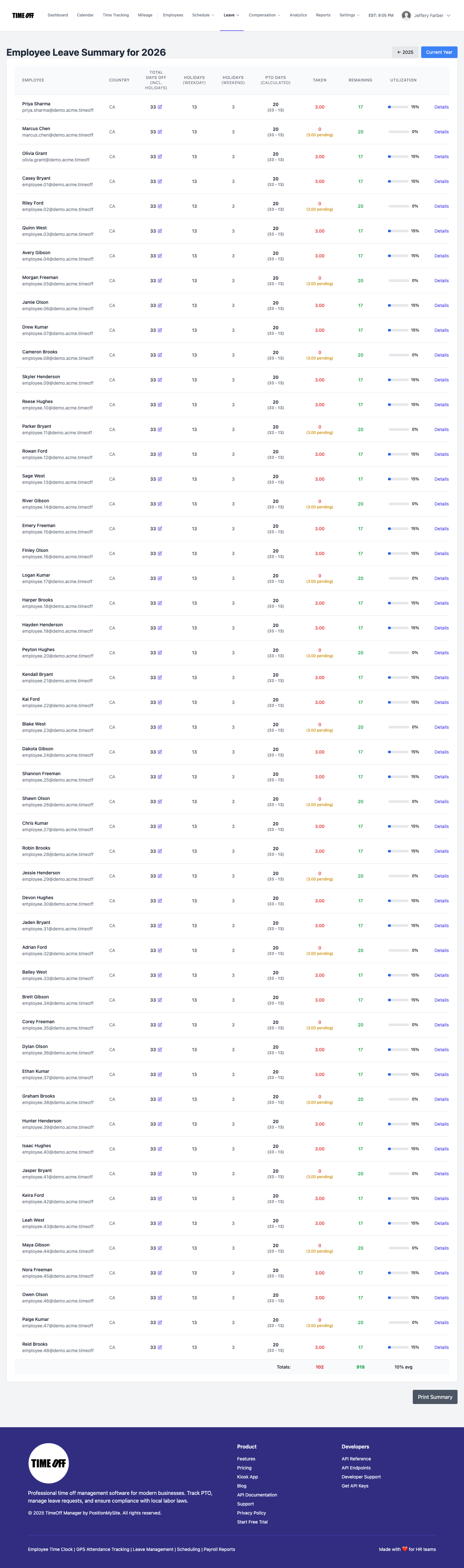
Leave summary — /admin/summary