Compensation: Employee records (admin)
Hub at /admin/compensation when compensation & payroll is enabled: filter roster by employee, type, and status; card grid of salary/hourly/contract records; add, view, edit, history; optional Hire Employee to job-offer flow.
/admin/compensation
Roles
Company admin · Super admin · HR manager
Compensation at /admin/compensation is the admin directory of pay arrangements for people in your company: hourly rates, salaries, contractors/contracts where your product supports them, pay frequency, effective dates, and links to detail, edit, and change history. It complements payroll runs and company-level payroll policy in settings.
Overview
Use the hub to see who has active compensation on file, narrow the list with filters, and open a card for the full picture. Many teams start from Add Compensation for existing employees or from Hire Employee, which opens the Job offer wizard at /offers/create for new-hire offers.
Enabling access
The company must have Compensation & Payroll enabled—typically in the Setup wizard or equivalent. If it’s off, visitors are redirected to complete that setup first. The in-app page may also show a disabled state when the feature flag isn’t on for the session.
What’s on the page
- Title — Compensation with subtitle about salaries, rates, and benefits.
- Actions — Hire Employee (when shown for your role) and Add Compensation.
- Filters — Employee, compensation type (e.g. hourly, salary, contractor, contract), status (active / inactive / all), plus Filter and Clear.
- Results — Card grid per person with rate, type, frequency, status, and View / Edit / History; or an empty state with the same primary actions. Those actions map to Compensation: View, edit & history (/admin/compensation/{id}, /edit, and /employee/{userId}/history).
Typical workflow
- Confirm the module is on for the company.
- Add or import compensation rows for each employee who needs payroll-ready data.
- Use filters during audits or before a pay period.
- Use History when you need prior effective-dated versions.
Related
Per-record screens and change timeline: View, edit & history. Onboard new hires with pay and benefits via Job offer wizard (/offers/create). Payroll runs, history, and payment processing are documented in Payroll: Runs & history (/admin/payroll); tax settings use separate URLs when exposed. Company-wide approver and payroll governance options are summarized under Company settings → Payroll. The roster of people still lives in Employees: Admin roster.
Product screenshot
Automated capture: full page after login as demo company admin (compensation & payroll enabled).
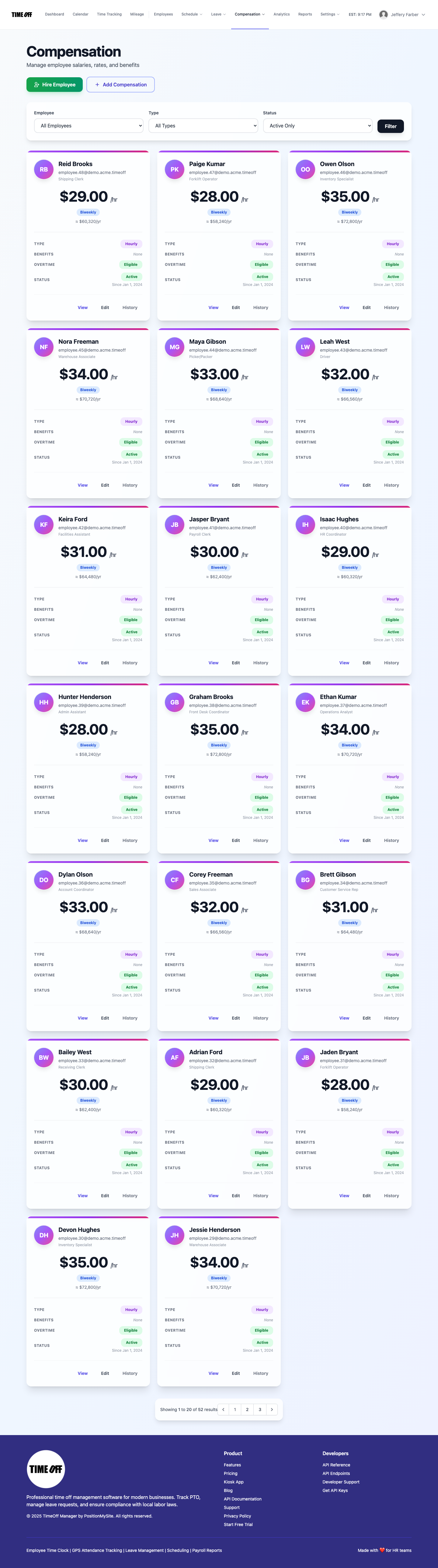
Employee compensation — /admin/compensation