PTO software, clocks & overtime (product guide)
How integrated leave and time tracking make overtime easier: punches, weekly grids, admin rules, payroll handoff—plus links to every major doc and trusted compliance references.
/timesheet
Roles
Company admin · HR manager · Manager · Employee (context)
TimeOff Manager combines leave (PTO) with optional time tracking, scheduling, and payroll-ready reporting so HR isn’t reconciling three spreadsheets every Friday. This guide explains how that design makes overtime easier to see and defend—then points you to the exact routes in our documentation library.
Why PTO + time in one place
When employees request time off in the same workspace where they clock in, you avoid the classic mismatch: “PTO approved on the calendar, but the punch file still shows a full shift.” Admins turn modules on in the setup wizard, and everyone lands on a dashboard that reflects your policy—balances, clocks, and shortcuts together. Staff manage requests from Leave: My requests while managers review coverage on Calendar: Team timeline or Employee month view.
What makes the platform stand out
The full feature map lives in the public documentation hub (same content as /help/docs on your domain). Highlights that teams cite most often:
- Time tracking & oversight — Employee timesheet for day-to-day punches; Manager & HR hub at
/timesheetfor roster, weekly grid, and monthly rollups. - Shared-device clock — PIN kiosk at
/clockinfor break rooms and job-site tablets without full logins. - Overtime policy — Overtime: Admin rules for company defaults and per-employee overrides, aligned with Company settings.
- Schedules & guardrails — Schedule management, Shift templates, and Validation rules so planned hours and actual punches don’t silently diverge.
- Payroll & exports — Payroll runs, Reports & exports, and optional Accountant access for read-only advisors.
- Insight — Analytics for overtime and hours patterns alongside leave KPIs.
Want a safe sandbox? Use Demo logins to explore the Acme training tenant without touching production data.
How overtime hours add up
Overtime stops being a manual math puzzle when each step is recorded once and rolled forward automatically:
- Punch in / punch out — Web or kiosk captures real in/out times (and optional GPS where your policy enables it—see Work locations).
- Sessions & regular hours — The app derives session length and regular hours per day from those punches, visible on the grids described in Timesheet: Manager & HR hub.
- Tagged overtime — Company rules in Overtime: Admin rules classify hours above your thresholds; the weekly view surfaces totals so payroll can match what finance expects.
- Pay period handoff — When compensation is enabled, structured pay data flows through Compensation records and Run Payroll with fewer “Excel bridge” errors.
Nothing here is legal advice; your counsel sets thresholds and premium rates. The product’s job is to keep inputs consistent so calculations are traceable.
Browse every screen in the library
New pages ship with the same template: in-app path, who can access, and screenshots where available. Start at the documentation library and jump by section (Getting started, Leave, Time tracking, Mileage, Employees, Scheduling, Company settings, Insights, Calendar)—the same structure mirrored on timeoffmanager.us/help/docs.
Further reading (compliance)
These U.S. government and professional sources explain baseline overtime concepts; always confirm against current law and your state rules:
- U.S. Department of Labor — Overtime pay (Wage and Hour Division overview).
- Cornell Law School — Fair Labor Standards Act (Wex overview) (legal background; not legal advice).
- IRS Publication 15 (Employer’s Tax Guide — withholding and reporting context for payroll teams).
- SHRM (Society for Human Resource Management — HR policy and workplace resources).
- Fair Labor Standards Act (encyclopedic summary; not a substitute for legal counsel).
Weekly grid example
Below is a stylized example of a weekly view: clock times, session counts, regular vs. tagged overtime hours, and weekly totals—the kind of roll-up managers use before approving payroll.
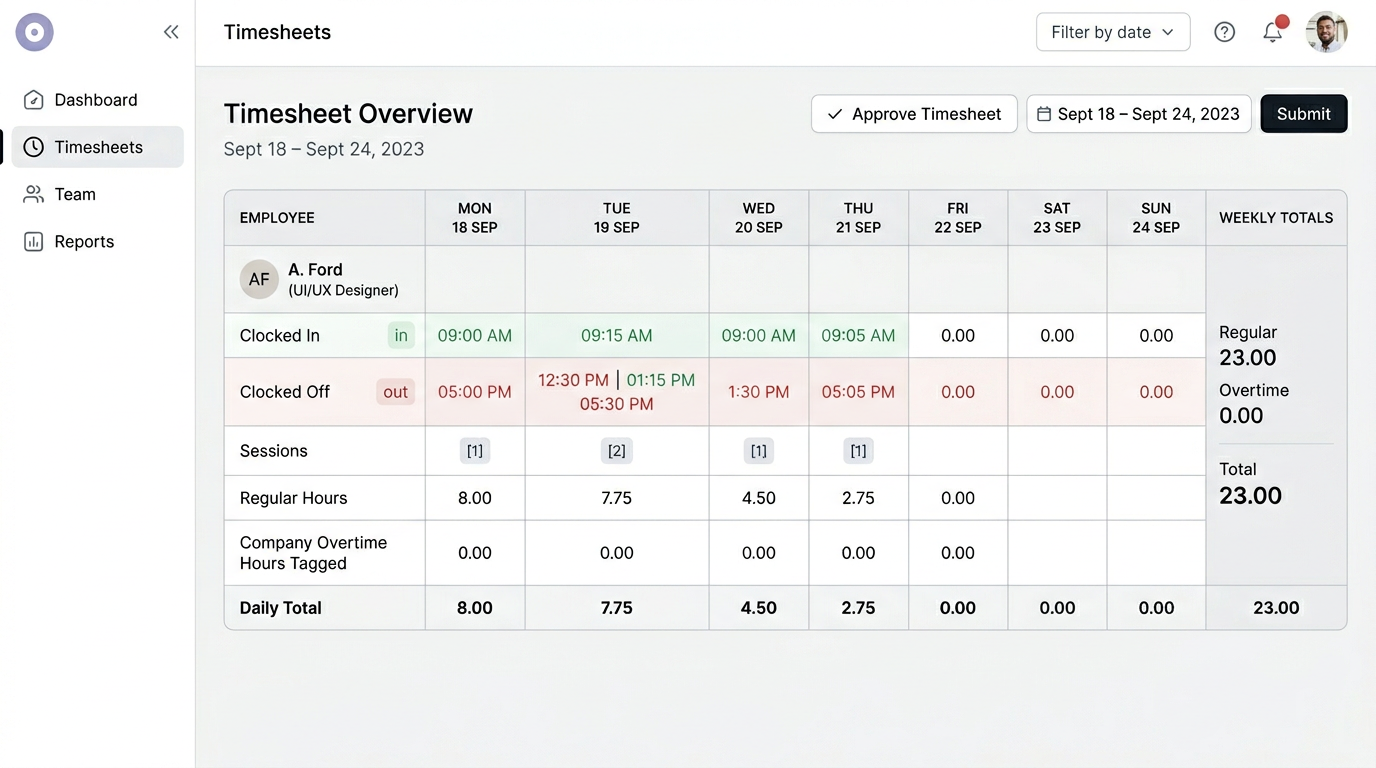
Illustrative weekly grid: punches roll up to daily and weekly hours, with overtime broken out for review.